Contents
Introducing Yet Another Digital Voting System (YADVS), a project aimed at showcasing the technical aspects behind building a secure, scalable, and efficient digital voting platform for community-driven decision-making. While YADVS could address real-world voting challenges in local governments, organizations, and community groups, the primary focus of this initiative is to explore and demonstrate key software engineering concepts. From implementing authentication and role-based access to designing microservices for vote counting and scalable deployment, YADVS serves as a hands-on platform for delving into modern development practices while creating a robust, real-world applicable solution.
The YADVS core project is designed to provide a foundational application that will later be cloned to explore various aspects of the software development process. The initial version includes the following core functionalities:
- Creating and managing polls: Anyone can create, edit, and organize polls for community participation.
- Casting votes: Anyone can cast their votes.
- Visualizing results: Poll results are displayed in real-time, offering clear insights through visual representations.
You can access the YADVS initial repository on [GitHub]. This project serves as a starting point for demonstrating how additional features, such as authentication, authorization, containerization, microservices, and more, can be layered onto a basic digital voting system.
Elements of Functional Requirements
User Interaction
The home page of the application will allow the filtered visualization of the existing polls list and the creation of new polls.
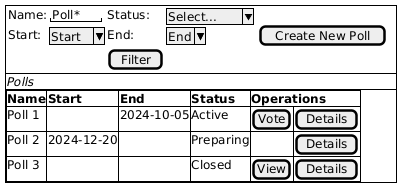
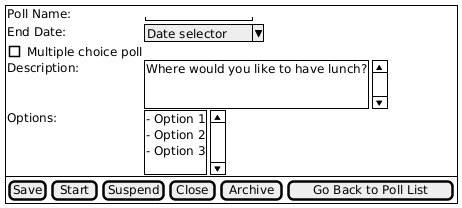
Once the user clicks on [Create New Poll] or [Details] the application will navigate to the Poll editing page.
[Vote] or [View] buttons will direct the user to the voting page which will also contain an updated view of the election result.
![PlantUML Syntax:
@startsalt
{#
{
Where would you like to have lunch?
.
() Option 1
() Option 2
(X) Option 3
.
[Cast Vote]
.
====
.
Results chart
{
{/ Option 1:
Option 2:
Option 3:
} | {
xxxxxxxxxxxxxxxxxxxxxx
.
xxxxxxxxxxxxxxxxxxxxxxxxxxxxxxxxxxxxxxxxxxxxxxx
.
xxxxxxxxxxxxxx
}
}
}
}
@endsalt](http://www.plantuml.com/plantuml/img/ut8eBaaiAYbEp2dXgbRcgkOApqWjIbKepo_DIL6ep2zLoCdCJbKeoLV8I2nBLSWfpKlEiEVIuzBGLF0lACdCprCmH68RSMb4m3d6G6NHped59GfX-IMfiK2UBH00gQ3KujASacA5v0oWnLn0AwlruOPPSS6CWhEChRXg5MeKghagi0AWWHMa0GmTNBLGw92Qbm8E2G00)
It is mandatory to keep a detailed track of all the actions that happen to a poll once it is activated.
Also, once the poll is activated it ca no longer be edited.
Poll lifecycle
This diagram illustrates the complete lifecycle of a poll. Each node within the diagram represents a distinct state, and each state is characterized by the permissible operations that can be performed on the poll. A subset of these operations is distinguished by their ability to transition a node from one state to another. These operations are referred to as actions. The arrows indicating the navigable paths within the poll lifecycle are labeled with the corresponding actions. It stands to note that some actions can be performed manually by the user via UI and others can be performed automatically by the system.
![PlantUML Syntax:
[*] --> Draft : (create-new-poll)
Draft --> Deleted : (delete)
Deleted --> [*]
Draft -> Active : (start)
Active -> Suspended : (suspend)
Suspended -> Active : (start)
Active --> Closed : (close)
Suspended --> Closed : (close)
Closed --> Archived : (archive)
Archived --> [*]
Draft : - the poll can be browsed
Draft : - the poll can be edited
Deleted : - the poll is removed from database
Deleted : (no recovery is possible)
Active : - the poll can be browsed
Active : - the users can cast votes
Active : - the users can view results
Suspended : - the poll can be browsed
Closed : - the poll can be browsed
Closed : - the users can view results
Archived : - the poll cannot be browsed
Archived : - the poll and its history remains in the database](http://www.plantuml.com/plantuml/img/ZP51ReGm34NtEOMNGoKkqCL8e_O6NLPTXCGZ8cKI51jGRr-708LgGDqv_i_VoO_wVFc2khx2Uz9tXbUuc8IQiGuurbtqlb95cHZqo6WpPQTInBcLPR5Qu2lS3Bi1Cqgi4rTgReZqqLE7mHOZAeTA_NRFfaLxyv7AhCdLRlAPF3UoTakc5Pj9rQKMwwMvl44jMTJ0BK9E0OmEq20qAOvYTaAWTPo1DQeDuWWIFcBUTK_n0LQpRZJXXhw4A8mH9drdlej4hl6u9d1sgpz8JvXeOemcXY4oqZ4pE1nbDVMUIMs_w7ZV6lM_aODrct_PMuN8kmS-vNImu9YWTSHHOfECjGi4BapCcl8F)
Here’s a breakdown of the diagram:
- Initial State:
- The poll starts in a creation phase. The transition from the initial state to “Draft” happens when a user creates a new poll.
- Draft State:
- In this state, the poll can be browsed and edited by the creator.
- Transition options:
- The poll can be deleted, moving to the “Deleted” state.
- The poll can be started, moving it to the “Active” state.
- Deleted State:
- Once a poll is deleted, it is removed from the database. There is no possibility for recovery (no recovery is possible).
- The system transitions from “Deleted” to the final state.
- Active State:
- In the active state:
- The poll can be browsed.
- Users can cast votes.
- Users can view the results.
- Transition options:
- The poll can be suspended, moving to the “Suspended” state.
- The poll can be closed, moving to the “Closed” state.
- In the active state:
- Suspended State:
- In this state, the poll can only be browsed, but no votes can be cast.
- Transition options:
- The poll can be restarted, moving back to the “Active” state.
- The poll can be closed, moving to the “Closed” state.
- Closed State:
- In the closed state:
- The poll can be browsed.
- Users can view the results, but no new votes can be cast.
- The poll can be archived, transitioning it to the “Archived” state.
- In the closed state:
- Archived State:
- In the archived state, the poll can no longer be browsed, but its data and history are retained in the database.
- The system transitions to the final state after archiving.
- Final State:
- Polls in either the “Deleted” or “Archived” states transition to the final state, representing their end of life in the system.
Data model
The data model is a logical representation of the data that the application will store, process, and retrieve. It typically consists of entities (tables), attributes (columns), and relationships between entities.
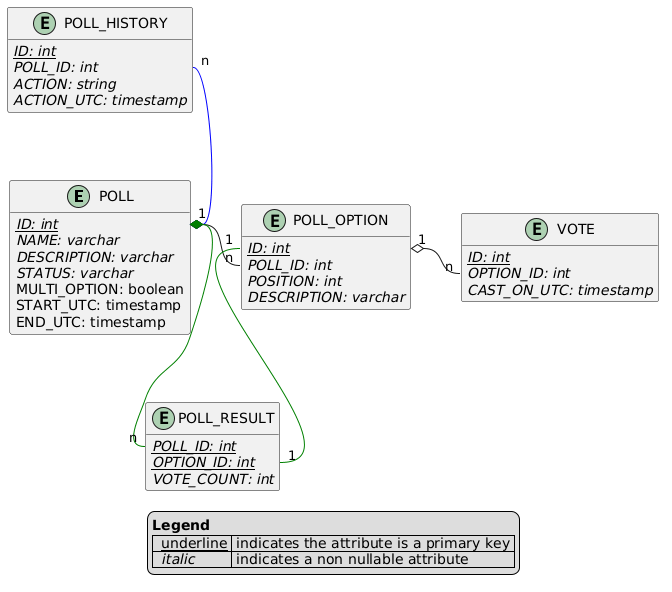
As summarized in the diagram above, the database consists of four key tables: POLL, POLL_OPTION, VOTE, and POLL_HISTORY, each responsible for storing data related to polls, options, votes, and audit history.
- POLL – stores details about each poll, including its metadata and configuration:
- ID: The primary key of the table.
- DESCRIPTION: A text field providing a detailed explanation of the poll’s purpose.
- STATUS: Indicates the current status of the poll (e.g., Active, Closed, etc.).
- MULTI_OPTION: A boolean flag determining whether voters can select multiple options.
- START_UTC: A timestamp denoting when the poll opens for voting.
- END_UTC: A timestamp for when the poll closes.
- POLL_OPTION – holds the various options that voters can choose from in each poll:
- ID: The primary key of the table.
- POLL_ID: Foreign key linking the option to its corresponding poll.
- POSITION: An integer representing the order or ranking of options within a poll.
- DESCRIPTION: A text field explaining the option.
- VOTE – logs each vote cast, including the option selected and when the vote was made
- ID: The primary key of the table.
- OPTION_ID: Foreign key linking the vote to the selected poll option.
- CAST_ON_UTC: A timestamp capturing when the vote was submitted.
- POLL_HISTORY – tracks changes and actions taken on a poll for auditing purposes:
- ID: The primary key of the table.
- POLL_ID: Foreign key referencing the poll for which the action was taken.
- ACTION: Describes the action taken on the poll (e.g., Created, Updated, Closed, etc.).
- ACTION_UTC: A timestamp recording when the action occurred.
- POLL_RESULT – aggregates and stores poll results to optimize performance by avoiding repeated calculations during result queries.
- POLL_ID: Foreign key linking the result to a specific poll.
- OPTION_ID: Foreign key referencing the poll option.
- VOTE_COUNT: An integer representing the total number of votes for the option.
Relationships
- One-to-Many: Each poll (POLL) can have multiple options (POLL_OPTION), as denoted by the POLL_ID foreign key.
- One-to-Many: Each poll option (POLL_OPTION) can have multiple votes (VOTE).
- One-to-Many: Each poll (POLL) can have multiple history entries (POLL_HISTORY).
- One-to-One: Each POLL_OPTION has a corresponding result record in the RESULTS table.
- Many-to-One: Each result (POLL_RESULT) belongs to a poll (POLL), but a poll can have multiple results.
This data model ensures flexibility and scalability, allowing efficient handling of complex voting scenarios while maintaining a clear audit trail.
Deployment
The application will run on a machine from the local LAN from a set of Docker containers.
Only LAN computers are required to access it.
Leave a Reply